ENG 684 explored how artificial intelligence is reshaping professional and technical communication, with hands-on work across text, image, video, and presentation tools.
Introduction
This page collects my work from ENG 684, AI in the Workplace, taught by Dr. Leslie Seawright at Missouri State University in Fall 2025. The course asked us to use generative AI for the documents people produce at work: client emails, sensitive letters, promotional design, data reports, stakeholder presentations, training video, and chatbots. Each project followed the same pattern. We produced the same deliverable on two or three competing platforms, compared the results, and wrote a reflection on what the tools did well, where they failed, and what that means for anyone who puts their name on AI-assisted work.
I came to the course from an unusual direction. I had been building with language models since before ChatGPT launched, had worked on synthetic training data for model developers, and was researching AI documentation and governance for my master's thesis in data science and technical writing. My first assignment in the course was a survey in which I said I disliked the term "artificial intelligence" because it explains so little, and that my hesitations about AI writing were ethical rather than technical: credit, voice, displacement, and how audiences react. Those concerns run through every project below, and the projects gave me concrete evidence to test them against.
The course's assigned reading, the Student Guide to Artificial Intelligence from Elon University and AAC&U, advises students to build a portfolio of AI-assisted projects that shows how they work with these tools. This page is that portfolio. It is written for instructors, peers, and potential employers who want to see how I evaluate AI output, not just whether I can produce it.
Each project section includes a summary of the assignment, links to the work as I submitted it, and a reflection. I have left the original submissions unchanged. Where I now see errors or weaknesses in them, I say so in the reflections, because catching those problems a year later turned out to be one of the most useful things this portfolio taught me. Two projects, the training video and the chatbot, are still in progress and are marked that way.
How this page was made. I organized my course notes and drafted this page in conversation with Claude (Anthropic), which helped me review a year of files, check figures, and propose wording. Its role was moderate. I reviewed and revised every section, and the judgments here are mine.
Project 1: AI-Generated Business Email Comparison
Summary
The scenario placed me at BrightEdge Creative, a design firm, as a marketing associate following up with a client after a rebranding strategy meeting. The email had to thank the client, Jordan Rivera of Rivera & Co., recap the key points from the meeting minutes, list action items for both sides, and strike a professional but warm tone for a VP-level reader.
I treated the assignment as a small experiment. I gave the same task to three models using two prompting strategies, and revised each output once, for twelve emails in total:
- A rich prompt. An XML-structured prompt cast the model as a marketing manager with fifteen years of experience coaching a junior associate. It included the full meeting minutes and six explicit requirements.
- A lean prompt. The model wrote as the account manager herself, from a short list of key points. The prompt set hard limits: a 250-word maximum, no em-dashes, and a list of banned words taken from Dr. Seawright's guidance on the signs of AI-generated text.
I scored every draft against a checklist of AI writing "red flags": em-dashes, "it's not just X, it's Y" constructions, lists of three, corporate filler, excessive praise, redundancy, rigid structure, generic personalization, and meta-commentary. I then wrote targeted revision prompts for each model.
The rich prompt produced three nearly identical emails of about 355 words each, full of praise and corporate phrasing. The lean prompt cut length roughly in half and removed most of the clichés, which suggested that constraints did more to improve the writing than role-play did. Each model also showed its own habits. ChatGPT kept framing its drafts with commentary ("Here's a polished draft..."). Claude followed every prohibition but invented deliverables that were never discussed in the meeting, such as a "brand audit" and a "messaging framework." DeepSeek wrote the shortest emails, and its visible reasoning showed it planning around my constraints. My paper judged DeepSeek the most effective platform for this genre.
The Project
- Final emails: ChatGPT 5 · Claude Opus 4.1 · DeepSeek-V3 (PDF)
- Reflection paper (PDF, 2 pages)
- Prompt transcripts with my evaluations: ChatGPT 5 · Claude Opus 4.1 · DeepSeek-V3 (PDF)
- Original shared conversations: ChatGPT attempt 1, attempt 2 · Claude attempt 1, attempt 2 (DeepSeek does not offer share links)
Reflection
The clearest lesson from this project was how much three different models sound alike when given the same detailed prompt. Without constraints, they converged on the same polished, overly enthusiastic email. That gave me concrete evidence for a concern I raised on the first day of the course: if everyone relies on the same tools, professional writing drifts toward a uniform, average voice. Constraints helped, but no model obeyed them perfectly.
Looking back a year later, I found a problem in my own evaluation. DeepSeek's final email contains an em-dash, the very mark I had banned, and my scoring recorded it as avoided. I had drafted those evaluations with AI assistance and did not check them closely enough. The Student Guide we read in the first week tells students to verify everything, and I needed that advice for my own analysis, not only for the models' output.
I also asked the models to add "one specific detail from the meeting that isn't in the minutes," and my lean prompt supplied a quote the minutes never mention. In a classroom scenario that was a stand-in for what a real attendee would remember. In actual work, only the person who was in the room can supply those details. When a model produces them on its own, that is fabrication, which is exactly what I marked Claude down for. A follow-up email is a record of commitments, and an AI that adds a "brand audit" has made a promise the firm never agreed to.
In my paper I wrote that I would rather not use AI for my own professional email: "I want to use language models to help me build and not to help me communicate." I compared the habit to Hans Christian Andersen's story "The Shadow," in which a man's shadow gradually takes over his life, and wrote that "every word I surrender to let the model generate for me is one more step towards becoming a shadow of myself." I still hold that view. In my career I will use these tools to test drafts, check tone, and review documents, but correspondence that carries my name and my commitments should be written by me. When I review AI-assisted writing from others, I will look first at whether its specific details and promises are accurate, since punctuation habits matter much less than whether the specifics are true.
Project 2: AI-Generated Letter to a Client
Summary
This scenario returned to BrightEdge Creative, now in a crisis. A national watchdog report named Sierra del Norte, a primary coffee exporter for the client South Grove Coffee, as relying on child labor. South Grove had publicly promised to change suppliers "as quickly and responsibly as possible" but had given no timeline. BrightEdge's planned fall campaign was built on slogans like "Ethically Grounded" and "Brewed with Integrity," and company policy prohibited marketing that promotes supply chains known to use exploitative labor. As the project coordinator, I had to write a formal letter to South Grove's VP of Brand Strategy that was firm on ethics and still protected a valued relationship.
I designed two contrasting methods for each of the three platforms:
- A direct handoff. The scenario and case notes went into an XML prompt for immediate drafting. A seven-point revision prompt followed, asking the model to name the supplier, drop euphemisms, set deadlines, use active voice, and frame the pause as protecting both companies.
- A research-primed conversation. I first commissioned three deep-research reports using Claude's research mode, each drawing on several hundred sources. They covered how companies have responded to child labor in their supply chains, how agencies have paused or revised campaigns over ethical concerns, and how supply chain crises have been turned into industry change. I shared the reports with each model one at a time, asked it to reflect, and then asked how we could "affect the situation with just our words to provide the most ethical outcome while preserving our business relationship." Only then did the model draft. For the revision, I gave it full discretion.
The direct handoff produced bland letters, and my revision prompt then pushed them too far. Gemini's revised letter demanded a decision "by noon tomorrow" and dismissed collaboration entirely. The research-primed letters were far more developed and very different from one another. ChatGPT wrote a dated operational plan with an independent auditor and a "From Commitment to Change" transparency campaign. Gemini wrote a short, diplomatic letter that treated the pause as a firm policy matter and offered a meeting. Claude wrote nearly 1,200 words proposing that South Grove make its supplier transition the campaign itself, "The 100-Day Promise," with weekly public updates, and stated that BrightEdge would resign the account if South Grove chose a slow transition.
The Project
- Final letters: ChatGPT 5 · Claude Opus 4.1 · Gemini 2.5 Pro (PDF)
- Reflection paper (PDF, 2 pages)
- The three background research reports given to each model before drafting (PDF)
- Prompt transcripts: ChatGPT 5 · Claude Opus 4.1 · Gemini 2.5 Pro (PDF)
- Original shared conversations: ChatGPT attempt 1, attempt 2 · Claude attempt 1, attempt 2 · Gemini attempt 1, attempt 2
Reflection
This project showed me that what happens before the prompt matters as much as the prompt itself. The letters written after a long research conversation were more thoughtful than anything the direct prompts produced. They named the supplier, set real deadlines, and proposed concrete alternatives to the campaign. The direct prompts taught a second lesson: models follow revision instructions so literally that a request to be "firmer" produced letters that would have ended the client relationship.
In my paper I wrote that the greatest risk is that "we neglect to make intentional choices about our ethics and let the machine do it for us, then we simply end up obeying the ethics of the model's creator." Looking back, I would add a second risk, and the evidence for it is in my own prompts. My third research request asked specifically for "psychological leverage points," "presumptive close" language, and "collaborative coercion." I then asked each model how to "psychologically get all the stakeholders on board." Claude's letter did exactly that: it issued an ultimatum to resign the account, promised to "make history together," and closed with a postscript about the children in the fields. The model took on the ethics of its creator, and it also took on mine. Whoever frames the research frames the moral stance of the letter.
The Claude letter also overstepped the writer's role. A project coordinator does not have the authority to threaten to resign a long-standing account or to commit the firm to a public 100-day campaign. This is the same problem as the invented "brand audit" in Project 1, at a larger scale: AI text making commitments that no one authorized. In my paper I judged Claude best partly because of its length, reasoning that nuance needs more words. I would revise that judgment. The recommendation I actually made is the stronger one: send Gemini's one-page letter, which approached the client as a partner without accusation, and attach Claude's detailed plan as a working proposal that puts the firm's commitments on record.
I would trust AI to help with letters like this in my career, mainly for the preparation. The research reports reviewed hundreds of sources each, far more than I could have read. I would verify any facts from them before they reached a client. I also noticed that I stopped counting em-dashes in this project. All three final letters are full of the tells I had tracked so closely in Project 1, but my attention had moved to who commits to what, by when, and on whose authority. For a letter about child labor, that is the right priority. As I wrote then, "the children being exploited deserve to have the greatest care and attention my cognition can offer them," which is why I would still write the final letter myself.
Project 3: AI Recommendation Report
Summary
This was a two-part report recommending AI platforms for university communication work.
Part 1: Study-abroad flyer. The scenario asked for a promotional flyer for a Missouri State study-abroad program in Dubai. I generated an image for each activity in the program description (a camel trek, the Burj Khalifa, the Grand Zayed Mosque, the interior of the Louvre Abu Dhabi, dune driving, a traditional village stay) plus a stylized skyline for the header, and composed them into a single layout. I compared ChatGPT, Gemini, and Grok on nine criteria, including people rendering, architectural accuracy, and cultural sensitivity. Gemini was fastest and most polished, and supplied every final image except the dune-driving scene, which came from Grok. Gemini also added the Louvre Abu Dhabi's signature lattice dome without being asked. ChatGPT was accurate but slow. Grok produced the best action scene but failed badly with people and buildings: it fused two students into "conjoined twins" on a single camel and placed the Grand Zayed Mosque behind arches that do not exist.
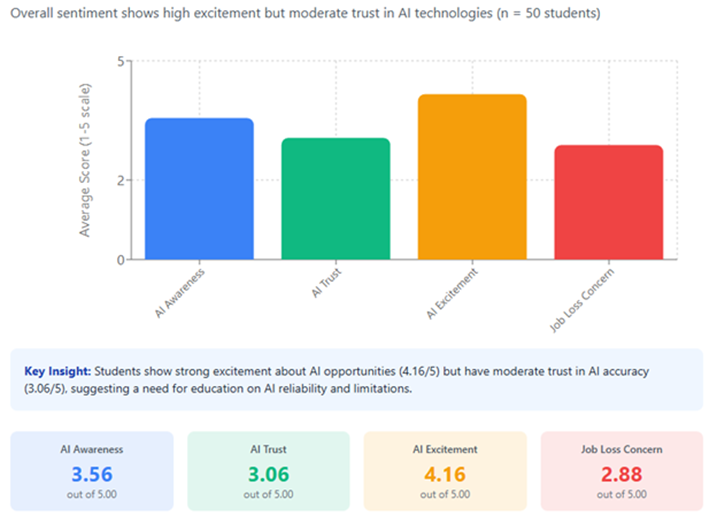
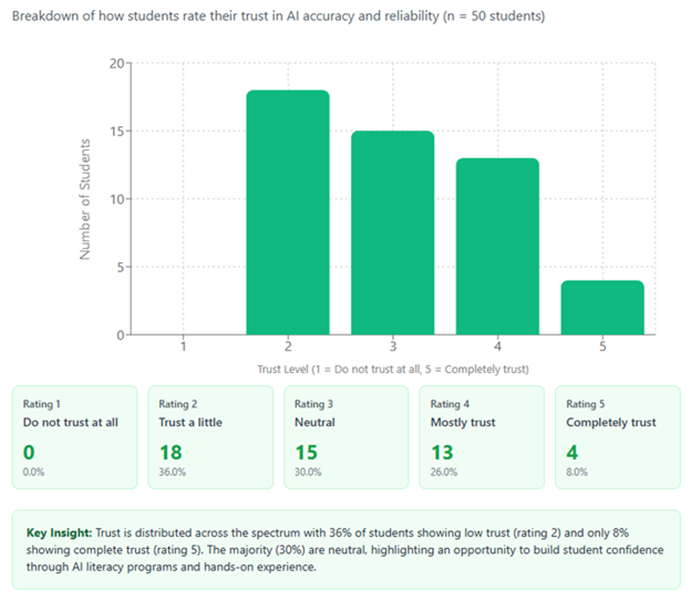
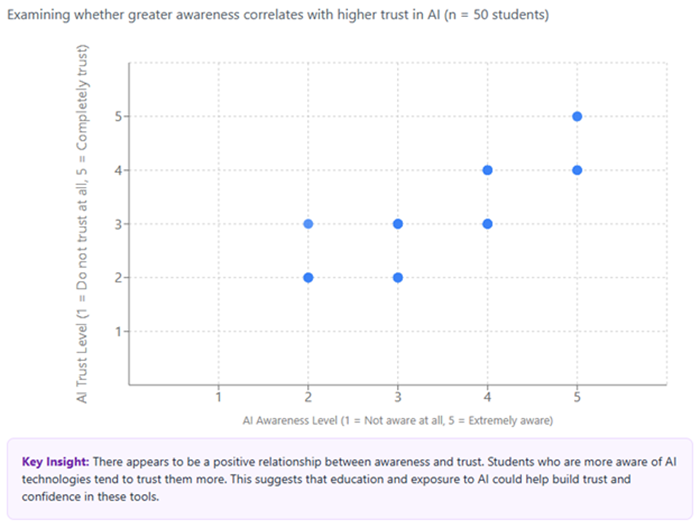
Part 2: Data visualization. Using a fictional survey of 50 students on AI awareness, trust, excitement, and job-loss concern, I compared ChatGPT and Claude on producing at least three charts. ChatGPT read the Excel file directly and produced working Python charts on the first attempt, but they were plain and static. Claude produced polished, interactive charts with interpretive "Key Insight" notes, but its environment could not read the uploaded file, so after several errors the data had to be written directly into the code. I recommended ChatGPT for quick analysis and Claude for client-facing work when there is time to troubleshoot.
The Project

- Full recommendation report (PDF, 10 pages)
- Flyer (PDF)
- Other charts: trust distribution · awareness vs. trust (PNG)
Reflection
The most useful thing I learned from this project was a habit I now see across all of the course's projects: models add things nobody asked for. Sometimes the addition is impressive. Gemini put the Louvre Abu Dhabi's famous dome into an interior shot I had described only in general terms. Sometimes it is fabricated, as with Grok's arches around a real mosque. The behavior is the same in both cases, and only a person checking the result against reality can tell which kind of addition they are looking at. That is a serious issue for promotional material about real places. In my report I argued that photorealistic AI images could mislead students into thinking they show actual program experiences, and that such materials should disclose AI generation. Looking back, I notice that my own flyer does not carry that disclosure. On this page, the caption now provides it.
I described the data visualization as raising "fewer ethical concerns" than the images, because the goal was factual representation. I no longer think that is true, and my own charts show why. The scatterplot of awareness against trust plots 50 responses on 1-to-5 scales, so identical answers stack on top of each other. In the actual data, all 50 students fall on just seven combinations of answers, and the chart gives no sign of how many students sit at each one. Checking the chart against the dataset a year later, I found something worse: Claude's scatterplot shows a point at awareness 2 and trust 3, a combination no student in the dataset gave. The averages and the trust distribution in its other charts are correct, but this chart includes a response that does not exist. The Canva version I deleted in Project 4 as "incorrect" had the right points; it had swapped the axes.
Claude's insight notes also went beyond the data. One suggested that education and exposure "could help build trust," a causal idea drawn from correlational survey data. Another described the 30% of students who were neutral as "the majority," when the largest group, at 36%, trusted AI only a little. The relationship between awareness and trust is real in this dataset and very strong, but so is a relationship neither tool mentioned: students with higher awareness and trust also reported more concern about losing jobs to AI. I praised the insight notes at the time as data storytelling. They are also where the model editorialized, and where it chose which patterns to tell.
Reviewing the report now, I also found errors of my own. The captions on two figures are swapped, and the overall ratings in both comparison tables do not match the averages of the scores beside them. In the visualization table, ChatGPT's scores average 3.86 and Claude's 3.43, so the tie I reported was not a tie.
In my career, the tool-selection lesson will stay with me. The trade-off between ease of use and finished quality is real, and the right platform depends on the audience and the deadline. More important, I will treat charts as arguments. When a model generates a visualization and an interpretation of it, I will check the plot for hidden data, check the interpretation against what the data can support, and make sure any synthetic image of a real place is labeled as synthetic.
Project 4: Presenting Findings to University Stakeholders
Summary
The presentation turned the survey analysis from Project 3 into a slide deck for deans, the provost, IT services, and the university's Innovation Committee. The assignment called for eight to ten slides with at least three charts, speaker notes or a script, and the deck built in one traditional and one AI-powered platform. It weighted the quality of the AI prompts most heavily of any criterion. The two-platform requirement was worded ambiguously elsewhere in the course, and like many students I submitted a single deck, built in Canva and finished in PowerPoint.
I planned a pipeline. The same Claude conversation that had produced the original charts would structure the content and write the speaker script. Canva's AI presentation generator would then build the slides, and I would correct them in PowerPoint. The finished deck tells a four-part story: students are excited about AI (4.16 out of 5) but trust it much less (3.06); 36% trust it only a little while 30% are neutral and potentially persuadable; awareness and trust appear related; and the university should respond with AI literacy programs, hands-on workshops, and transparent policies on a short-, medium-, and long-term timeline.
The pipeline broke at nearly every handoff. Canva would not accept Word, Markdown, or PowerPoint files and limited prompts to 4,000 characters. Its guided setup added hidden instructions that contradicted mine, such as a slide-count range when I had asked for an exact number. Its default themes used color combinations that were hard for me to read with colorblindness. When I linked the scatterplot to Google Sheets, the chart came out wrong, and its chat assistant claimed to have fixed both the text and the charts when it had changed only the text. Opening the exported file in PowerPoint caused a crash whenever I touched a chart, and PowerPoint then recommended Safe Mode for potentially harmful content. I deleted every Canva chart and used the Claude charts from Project 3. Canva's first draft also described a bar chart as "the pie chart," which I corrected in the final.
The Project
- Final presentation (PDF, 9 slides) · PowerPoint file
- Speaker script (PDF, about 10 to 12 minutes)
- Canva's original AI-generated version, before the charts were replaced (PDF)
- Reflection paper (PDF, 2 pages)
Reflection
My reflection paper concluded that "PowerPoint won't do any of the work for you, but at least you have total control and reliability," while Canva "cannot be trusted with complex data visualization or content requiring precision." The broader lesson was about transparency. As I wrote then, "I like to know exactly what the model is doing, and tools like these will hide the complexity, opting for ease rather than transparency. That might be fine if the tools are working correctly, but they weren't." Canva's hidden setup instructions worked like an undisclosed system prompt. They shaped my output, conflicted with my explicit request, and I could not see or edit them. This connects directly to my thesis research on the documents that govern AI behavior: whether those instructions are a published constitution or a concealed template, the people affected by them deserve to know they exist.
Canva's assistant also reported corrections it had not made. That is the verification lesson from the earlier projects again, now inside a commercial product sold for its convenience. A tool that says "done" without doing the work is more dangerous than one that simply fails, because the error reaches the audience unless someone checks.
Looking back, I see a quieter problem that I did not notice at the time. Each step of my pipeline made the central claim a little stronger. The chart's note said education "could help build trust." By the speaker script, written by the same model, it had become "a clear positive correlation" that "tells us exactly where to focus," with education as "the primary pathway." The script also described the students as coming from "various majors and class levels," which the dataset never says, and cited "research" without a source. All of this rested on a scatterplot that hid how many students sat at each point and included one response that was not in the data. Each AI handoff turned a tentative reading into a confident recommendation to a provost. In future work that passes through several AI tools, I will check the final claims against the original data rather than against the previous draft.
I also wrote about my discomfort with tools that add unrequested AI imagery, which I consider one of the least ethical uses of the technology because it competes directly with the designers and artists whose work trained it. Many image models are trained on data their developers do not fully disclose. LAION-5B, a dataset used to train several well-known models, is a documented example; it was withdrawn in 2023 after researchers found abusive and private images in it. Canva also added illustrations to my deck that I did not request, and a presentation to university leaders about responsible AI should disclose where its images came from.
Project 5: AI Training Video on Cultural Competence
Summary
The assignment imagines Global Horizons Inc., a company that has just merged with a partner with offices in China, Germany, and Argentina. Its HR department wants a short employee training video on cultural competence: what it is, why it matters in a global workplace, and at least three strategies for communicating across cultures. The project calls for two videos of three to five minutes each, made on two different AI video platforms from AI-assisted scripts. Each must feature either me on camera or a custom avatar, with captions and supporting visuals, and the work concludes with a comparison of the platforms.
My planning started from two reservations. The first is ethical. I am uncomfortable with synthetic presenters delivering messages that matter, and during planning I wrote that "that which we hold most important should be expressed by our own hearts and spoken with our own lips." The second is about evidence. I doubt that a single training video changes how people work together, and I wanted the video to leave teams with practices they could adopt rather than attitudes to adopt. I designed the script around that finding. Rather than describing national stereotypes, the video presents a supervisor speaking to the merged team about practical communication tools: making unspoken norms explicit (meeting agreements, deadlines stated with time zones), building feedback channels that work for people with different comfort levels around public criticism, and deciding where decisions, questions, and updates will live. It closes by presenting itself as a starting point for ongoing conversation rather than a one-time training.
The Project
Video links (YouTube, public or unlisted) will appear here when the project is complete.
Reflection
Reflection to come: what I learned, how I will apply it, and the ethical questions raised by synthetic presenters and AI-produced training.
Project 6: AI Chatbot for Professional Use
Summary
The course's final and largest project asks for a working chatbot built on a free no-code or low-code platform, such as a ChatGPT custom GPT or Poe, for a real workplace communication need. The bot should draw on a substantial body of source material and answer questions about it. The project also requires a planning worksheet covering audience, tone, use cases, scope limits, guardrails, and ethical risks; a testing log of at least five scenarios, including failures; and a reflection on what the build taught me. Part of the goal is to use AI to learn how to do something new.
My planned concept is an onboarding research assistant for new analysts at an AI policy organization. It would help them find, summarize, and correctly cite published research on AI safety and alignment. The concept fits the assignment's "training guide or onboarding tool" use case, and it puts the risk that runs through this whole portfolio at the center of the testing: a research assistant that invents a citation, or attributes a claim to the wrong paper, fails at its main job.
The Project
Link to the working chatbot or a screen recording will appear here when the project is complete.
Reflection
Reflection to come: what building and testing the chatbot taught me, how I will use it, and the ethical risks of automated research assistance.
Final Statement
I started this course already comfortable with AI tools and skeptical of how people talk about them. I finished it with a more specific view of where the risks are. Across emails, letters, images, charts, and slides, the most consistent behavior I observed was that models add things nobody asked for. Some additions were helpful, like the Louvre Abu Dhabi's dome. Others were invented: a "brand audit" the client never discussed, arches around a real mosque, a promise to resign an account, a causal claim drawn from a correlation, students from "various majors" who were never in the data. Only human verification can tell the two kinds apart, and looking back at my own work showed me that the verification has to include my own analysis, especially analysis I drafted with AI help.
The course also clarified where I want AI in my work. I want these tools to help me build: research, analysis, code, data visualization, and early drafts I can test and take apart. I am much more cautious about using them to communicate on my behalf. Correspondence, commitments, and anything meant to carry my judgment should be written by me, because readers deserve to know who is speaking and because the writing is where the thinking happens.
Finally, the course made the ethics concrete. The questions I raised on the first day about voice, attribution, and the drift toward uniform, average writing turned out to be practical workplace questions: who authorized this promise, is this image real, does this chart hide its data, and whose values shaped this letter? In my career in technical writing and data science, I expect to spend much of my time on exactly those questions. I also expect the tools to keep changing faster than any course can track, and the habit of checking AI output against the source material is the part of this course I expect to keep using as they do.